Constant Contact vs Mailchimp
Constant Contact vs Mailchimp: Key Differences for Small Businesses
If you’re running a small business, you’ve probably heard two pieces of “advice” a thousand times:
1) “Just use Mailchimp.”
2) “Constant Contact is easier.”
Both statements can be true. Both can also get you overpaying, under-automating, and rage-clicking through dashboards at 11:47pm before a promo goes out.
Here’s the deal: for most small businesses, this decision isn’t about features. It’s about how these tools charge you, how quickly you can ship campaigns, and how much help you get when something breaks.
Below are the real differences that matter when you’re trying to grow without hiring a full-time marketer.
ConstantContact
Mailchimp
The 15-second decision rule
Choose Constant Contact if:
- You want to send newsletters and basic automations without thinking too hard.
- You want phone/chat support and onboarding that feels more “small business friendly.”
- You run events, sell tickets, or do local promotions (classes, fundraisers, workshops).
Choose Mailchimp if:
- You care about automation flows, segmentation, and ecommerce triggers.
- You want a bigger ecosystem of ecommerce-style workflows (cart, browse, repeat buyers).
- You don’t mind doing a little list hygiene to avoid billing surprises.
If that didn’t settle it, keep going. The devil lives in the billing math.
1) Billing: “contacts” vs “contacts” (yeah, it’s annoying)
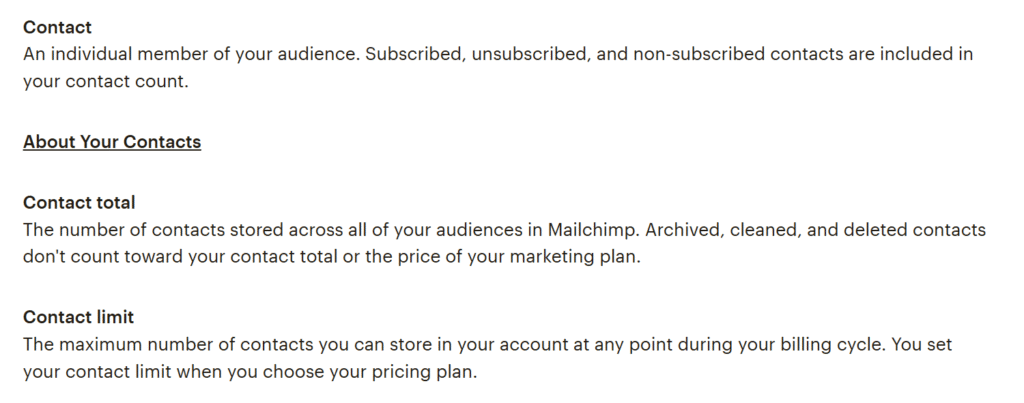
Mailchimp’s gotcha: unsubscribed and non-subscribed contacts can still count
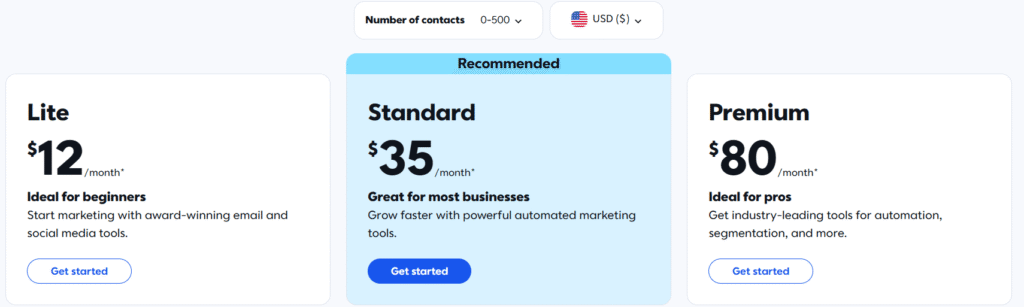
Mailchimp pricing is tied to your contact total, and that can include subscribed, unsubscribed, and non-subscribed contacts unless you archive/clean them. Translation: you can end up paying for people you literally can’t email.
This matters a lot if you:
- import customers from Shopify/Square,
- have old lists from past years,
- or run giveaways where people never opted in properly.
Practical example:
You import 5,000 customers. Only 2,800 are actually opted-in subscribers. If you don’t organize and archive properly, you can still be paying for the full 5,000.
Constant Contact’s approach: billed on “active” contacts
Constant Contact is also contact-tier based, but their docs/community guidance emphasize billing around active contacts, and that unsubscribed contacts don’t count toward billing tiers. That’s a quieter but real advantage if you’ve got a messy list.
Practical example:
If 1,500 people unsubscribed over time (normal life), you’re less likely to keep paying for that dead weight.
My take:
If you hate admin work, Constant Contact’s billing model is less likely to punish you for normal list churn. Mailchimp is fine—if you commit to list hygiene.
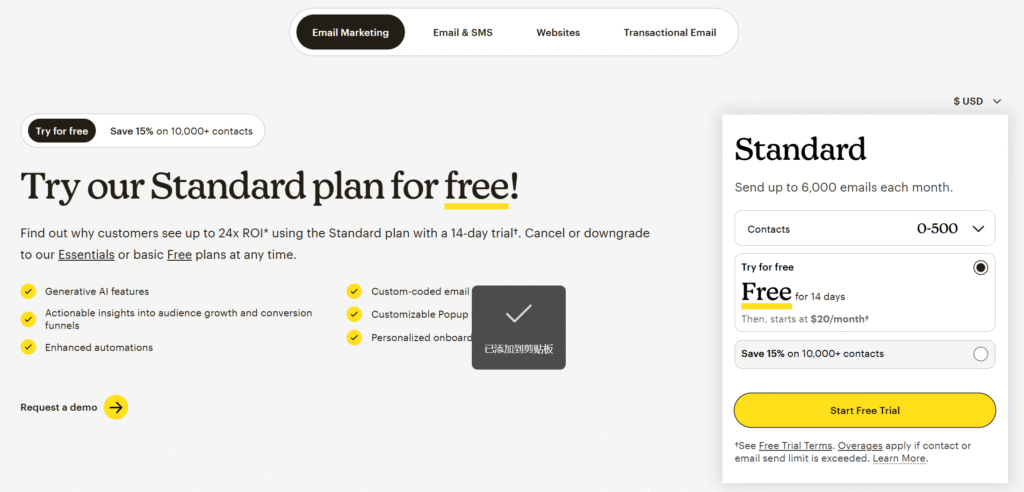
2) Free plans and “starting prices” aren’t apples-to-apples
Mailchimp: actual free plan (small, but real)
Mailchimp has a Free plan. It’s limited, but it exists. For tiny lists, that can be enough to validate your offer before paying.
The big limitation: you’ll hit send/contact caps quickly if you’re serious.
Constant Contact: trial, then paid
Constant Contact typically pushes a free trial, then you’re on paid plans. Their Lite tier is positioned for beginners, but it’s not a forever-free situation.
My take:
If cash is tight and your list is under a few hundred contacts, Mailchimp’s Free plan can be a legit “training wheels” phase. If you already know you’re sending newsletters every week, Constant Contact’s paid entry might be fine.
3) Email sending limits: the hidden scaling cost
Both platforms often tie monthly sends to your contact tier. That’s normal. What’s not normal is how quickly SMBs forget to check it until they hit a cap mid-campaign.
Constant Contact
Their plans commonly describe monthly sends as a multiple of your contacts (example: 10x / 12x / 24x depending on plan). That’s generous on the higher tier.
Mailchimp
Mailchimp also uses multipliers on paid plans (and has strict limits on Free). Their higher tiers tend to unlock more sending headroom.
Real-world scenario:
You have 3,000 contacts and you send:
- a newsletter weekly (4 sends),
- 2 promos,
- and 1 automated follow-up broadcast.
You’re suddenly at 18,000+ sends/month. If your plan caps you near that number, you’ll feel it.
My take:
If you email often, don’t choose based on the sticker price. Choose based on:
- your expected sends/month,
- how many “dead” contacts you’re carrying,
- and whether you need multiple audiences/lists.
4) Automation: this is where the platforms really split
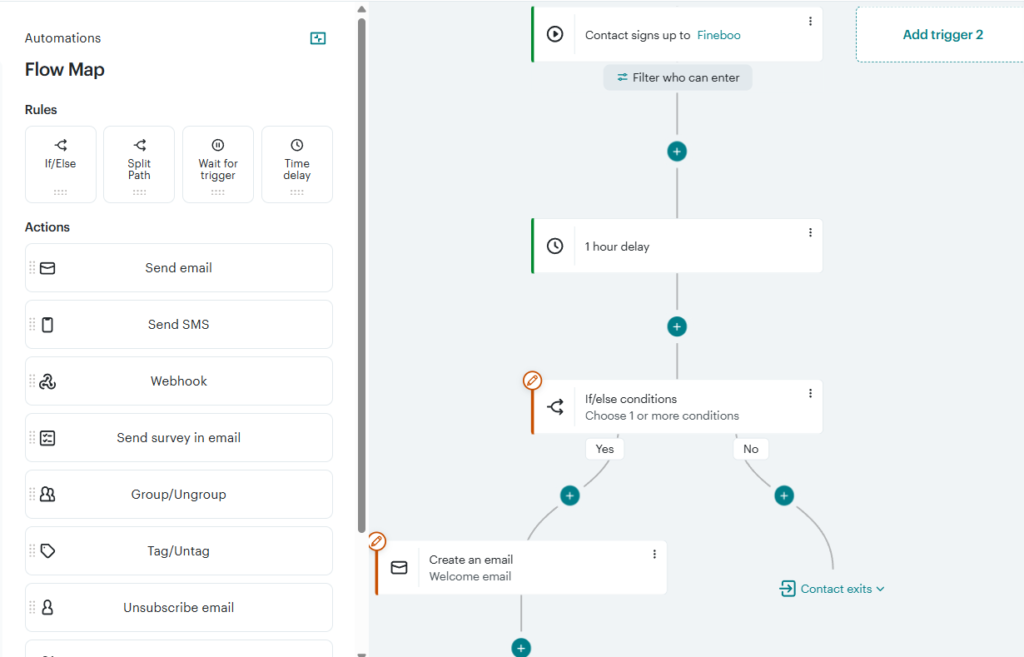
Mailchimp is the better “automation brain”
Mailchimp’s automation is built for behavior-based marketing: tags, triggers, journeys/flows, ecommerce events, segmentation logic.
If you want:
- abandoned cart sequences,
- post-purchase upsells,
- VIP/customer winback,
- product-based targeting,
Mailchimp is usually the more natural fit—especially once you’re on Standard+.
Constant Contact is the better “I just need it to run” tool
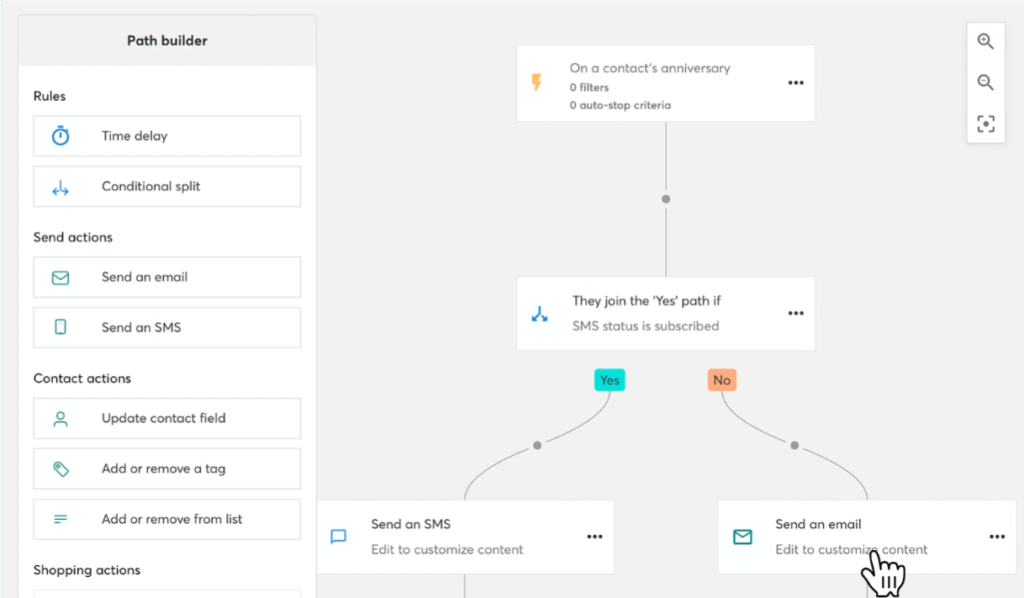
Constant Contact focuses on easier automation templates and guided campaign building. You can absolutely run welcome series, resends to non-openers, basic segmentation, and follow-ups.
But if you’re trying to build branching logic that feels like “if they clicked X and bought Y, do Z”… Mailchimp tends to feel less boxed-in.
My take:
- If your automation plan is “welcome series + occasional nudges,” Constant Contact is plenty.
- If your automation plan is “turn email into an actual revenue engine,” Mailchimp is usually the better bet.
5) Events, social posting, and “small business extras”
This is where Constant Contact has a very SMB-flavored advantage.
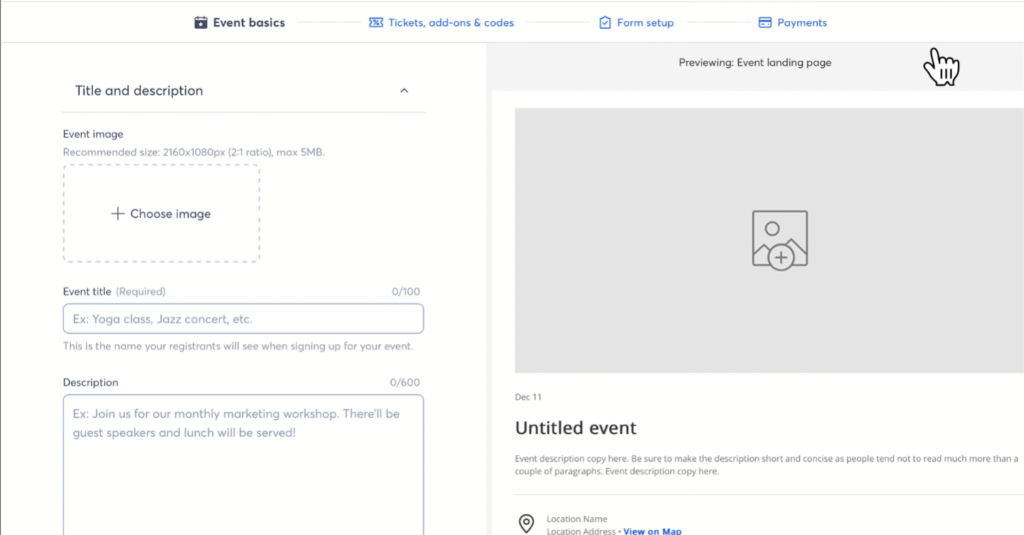
Constant Contact: events + social tools baked into the pitch
Constant Contact leans into:
- social posting/scheduling,
- event hosting/registration,
- payments/selling.
If you’re running workshops, fundraisers, local events, or membership drives, it’s nice to have these options without stitching together 3 extra tools.
Mailchimp: strong ecosystem, but you’ll integrate more
Mailchimp can absolutely support events and social promos, but it usually looks like:
- integrations,
- landing pages,
- and external tools.
If you already live in Shopify and a modern ecommerce stack, that’s not a problem. If you don’t, it can feel like “a pile of connectors.”
6) Support: who picks up the phone?
This is not a sexy category. It’s also the one you’ll care about most the first time your campaign gets stuck, your account gets flagged, or your import explodes.
Constant Contact: more human, earlier
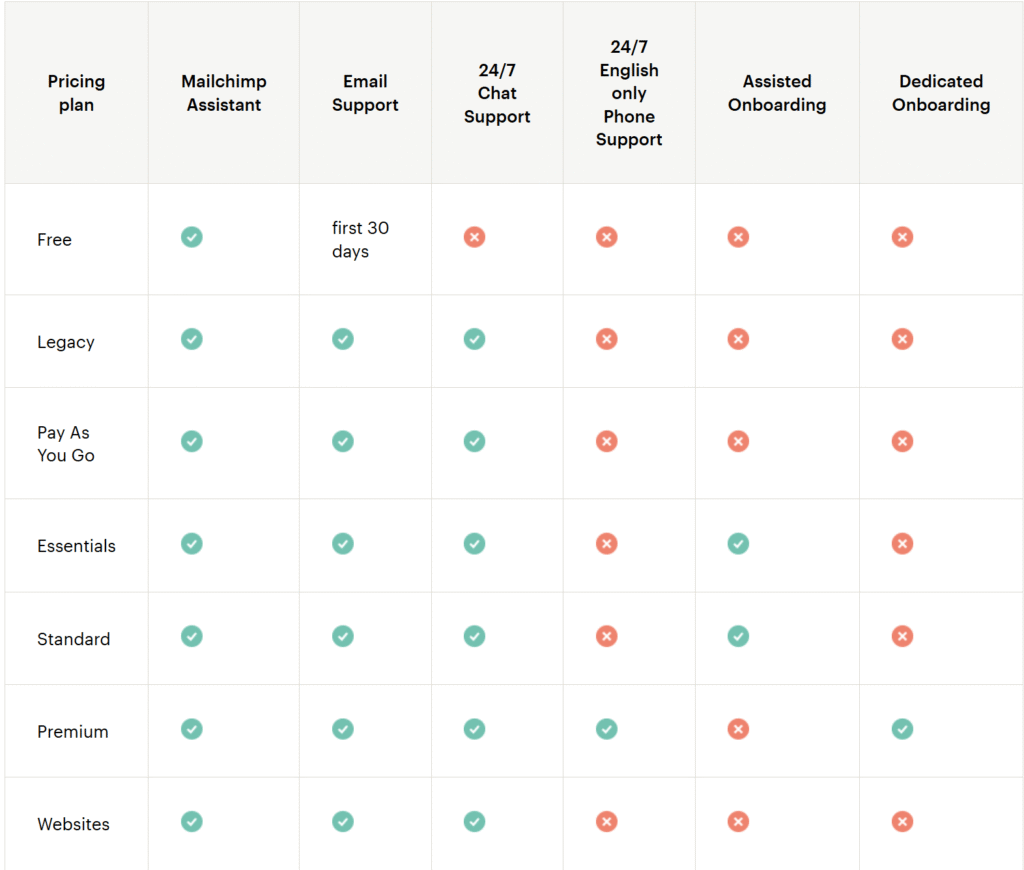
Constant Contact’s positioning is very “we’ll help you.” Phone and chat support are a core part of the story, plus onboarding.
Mailchimp: support depends heavily on your plan
Mailchimp support is tiered. Free users get limited help. Paid plans unlock chat/email, and phone support is typically a Premium-tier thing.
My take:
If you are not technical and you value fast human help, Constant Contact earns points here. If you’re comfortable self-serving through docs and you mainly want the platform horsepower, Mailchimp is fine.
How it compares to Brevo and Klaviyo (quick reality check)
If you’re not married to either tool, here’s the honest shortcut:
- Brevo is worth a look if you want a cheaper send-based model and you don’t want your bill tied purely to contact count. It’s often a budget-friendly alternative for SMBs who just need solid email + basic automation.
- Klaviyo is the ecommerce specialist. If you’re serious about Shopify-style segmentation and revenue attribution, Klaviyo can make Mailchimp feel “general-purpose.” (It can also get expensive as you scale.)
I’m mentioning these because small businesses often default to “Mailchimp vs Constant Contact” when the better answer is “neither.”
Who should pick what (no fluff)
Pick Constant Contact if you’re:
- a local service business (salon, studio, clinic, contractor) sending newsletters and promos
- running events or community-based campaigns
- short on time and you want support that feels like a safety net
Pick Mailchimp if you’re:
- ecommerce-first (or planning to be)
- serious about automation flows and segmentation
- willing to keep your audience clean so billing doesn’t surprise you
Skip both if:
- you want heavy automation at a lower cost (look at Brevo)
- you’re deep in ecommerce and want the “data brain” (look at Klaviyo)
- you hate contact-based billing and your list is messy (again: Brevo-style models can be less punishing)
If you tell me your business type (local service vs ecommerce vs nonprofit) and your list size, I can recommend the plan tier that won’t trap you in upgrade hell.