Our Methodology: How We Test Security Tools for Small Business
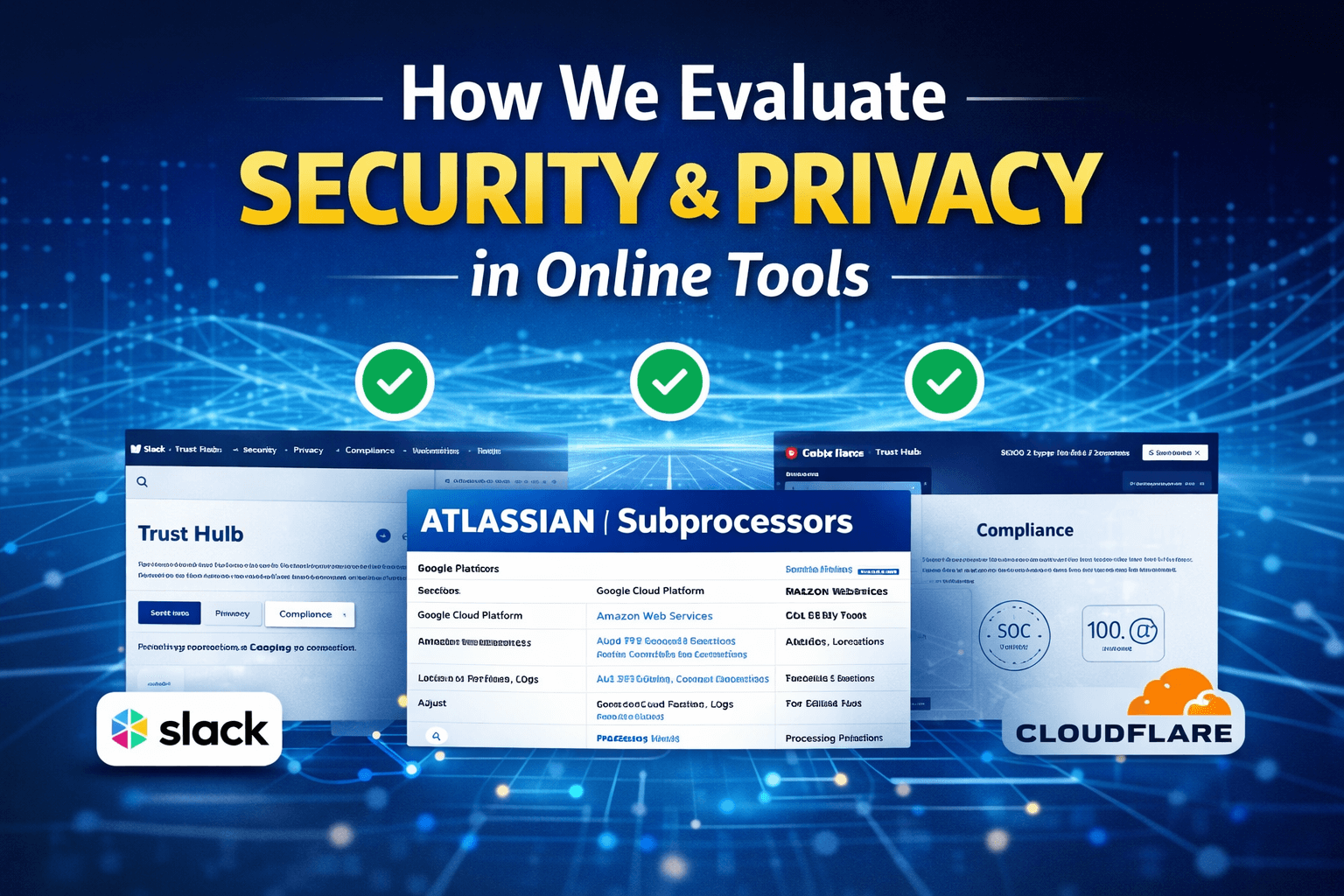
Most SaaS security pages are written like a Tinder bio: flattering, vague, and carefully cropped.
“We take security seriously.”
“Enterprise-grade.”
“Bank-level encryption.”
Cool. Now show me:
- Can I force MFA today?
- Can I see who exported data yesterday?
- Can I delete user data without a support ticket?
- Who else touches my data (subprocessors), and where?
That’s the vibe of our security + privacy evaluation. We’re not here to hand out gold stars for buzzwords. We’re here to reduce the odds that your business gets wrecked by a vendor you trusted too quickly.
The ground rules (what this is, and what it isn’t)
This is a buyer-focused evaluation. Think: “Should I trust this tool with customer data, employee info, invoices, or internal docs?”
What it is:
- A repeatable checklist + scoring rubric
- Hands-on testing in a real trial account (when possible)
- Evidence-based review of public documentation (trust center, privacy policy, subprocessors, status page)
- A “real world” lens: small teams, limited IT resources, high blast radius if things go sideways
What it isn’t:
- A penetration test
- A guarantee the vendor won’t get breached
- A replacement for your legal team (we’ll tell you what to ask for, not sign your DPA)
Our evaluation stack: 6 buckets that actually matter
If you only remember one thing: we care about controls, proof, and behavior under stress.
1) Account security (can humans mess it up?)
This is where most SaaS incidents start: weak auth, sloppy permissions, shared passwords, no MFA.
We test:
- MFA availability: Is it built-in or paywalled behind “Enterprise”?
- SSO / SAML: If it’s enterprise-only, do they at least support Google/Microsoft OAuth cleanly?
- Password policy controls: Minimum length, rotation controls, forced resets
- Session management: Can admins revoke sessions? See active sessions?
- API tokens: Scoped tokens? Expiration? Easy revocation?
A tool can have “SOC 2” stamped on the forehead and still ship a consumer-grade admin experience. That’s a problem.
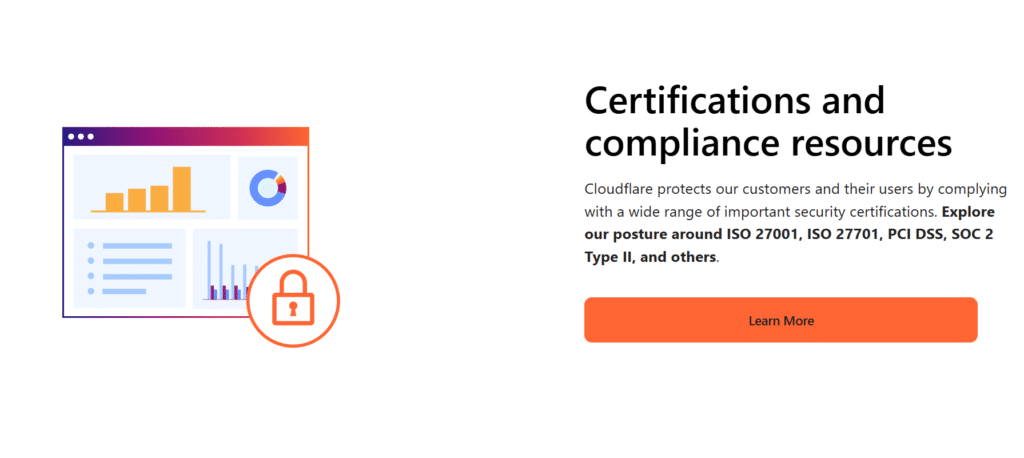
📸 [INSERT IMAGE #2: Example Trust Center landing page that links to security controls and compliance info]
2) Access control and admin reality (RBAC, audit logs, and “who did what?”)
If your team grows past 5 people, you need to stop relying on vibes.
We test:
- Roles & permissions (RBAC): Can we create a “billing-only” role? A “read-only” role? Or is it just Admin/User?
- Granularity: Project-level permissions, folder-level, workspace-level controls
- Audit logs: Not just “login history,” but actions (exports, deletes, permission changes)
- Alerting: Can we get notified when something risky happens (new admin, mass export)?
This is where tools separate “nice UI” from “I can run this responsibly.”
The hands-on tests we run in a trial account
Marketing pages are easy. Trials are where truth leaks out.
Here’s what we do, step by step:
Test A: “Can I lock this down in 15 minutes?”
I create a fresh workspace and try to secure it like a real admin would:
- Turn on MFA (and see if enforcement exists)
- Restrict invites (domain allowlist, approval flows)
- Disable public sharing links (or at least control them)
- Set default permissions to least privilege
- Confirm session timeout / idle logout options
If basic lockdown requires an upgrade + a sales call, that’s not “enterprise-grade.” That’s “enterprise-priced.”
Test B: “What happens when someone leaves the company?”
Offboarding is where data walks out the door.
We test:
- Can we suspend/deactivate a user instantly?
- Can we transfer ownership of assets?
- Can we revoke tokens and sessions?
- Do audit logs show what they touched recently?
If offboarding is clunky, you end up with ghost accounts and shared access. That’s how breaches get boring and frequent.
Test C: “Can I get my data out, cleanly?”
Data portability is both a security and privacy issue. If you can’t export your stuff, you’re trapped. Trapped vendors get lazy.
We test:
- Export formats (CSV, JSON, PDF, full backup)
- Export completeness (attachments, metadata, timestamps, relationships)
- Rate limits or weird “partial” exports
- Admin-only export controls (good) vs anyone-can-export (bad)
Test D: “Can I delete data without begging support?”
This is the privacy reality check.
We test:
- Account deletion flow: is it self-serve?
- Data deletion: can we delete individual records? Entire workspace?
- Retention controls: can we define retention windows?
- Proof/confirmation: do we get a deletion confirmation or log entry?
If deletion is vague (“we delete data periodically”), we mark it down hard.
3) Data protection fundamentals (encryption is table stakes)
We look for the basics, but we don’t clap for them.
We check:
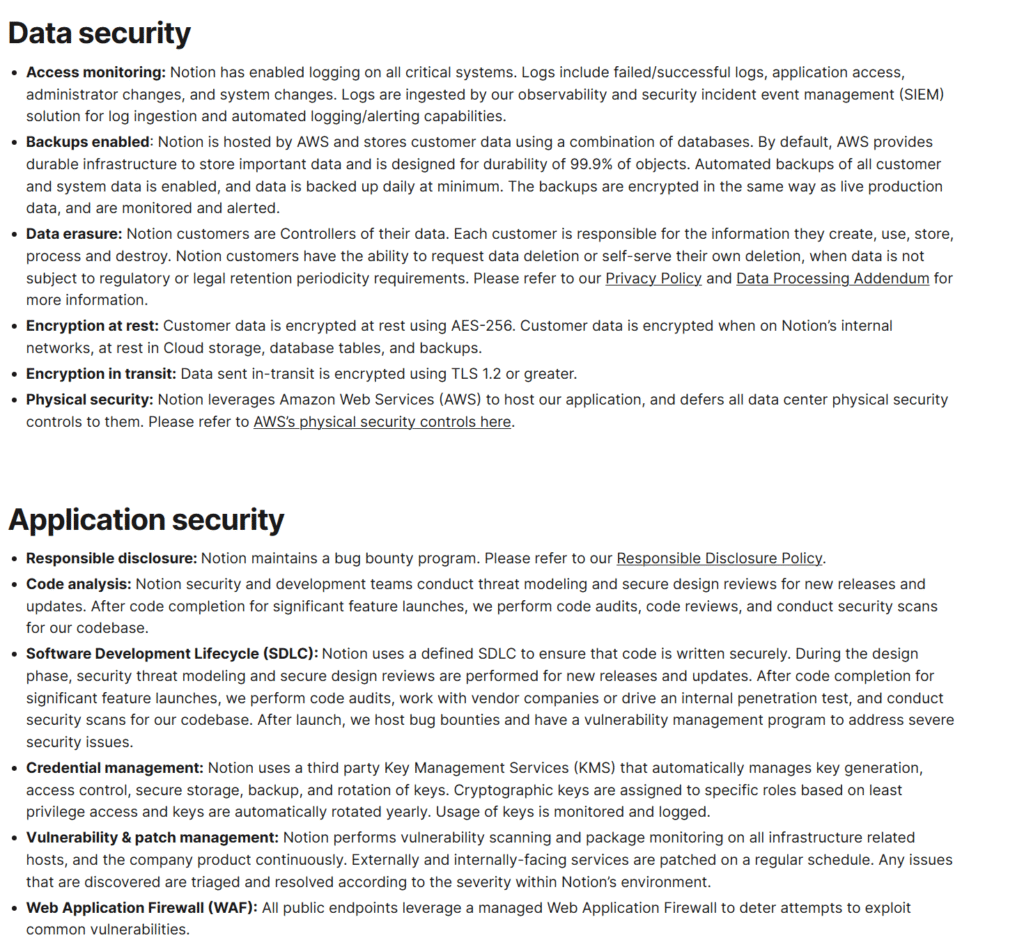
- Encryption in transit (TLS) and at rest
- Key management: do they mention KMS/HSM? customer-managed keys (CMK) is a big plus
- Backups: frequency, retention, restore testing (do they admit they test restores?)
- Data residency: region choices, clarity on where data lives
A lot of vendors say “encrypted at rest” and stop there. We want specifics where possible, and we want consistency across docs.
4) Privacy: not just “we comply with GDPR”
Privacy is where SaaS gets slippery, especially for “free” plans and ad-adjacent products.
We check:
- Data collection: what’s required vs optional (and can you opt out?)
- Tracking and analytics: do they use third-party trackers in the app?
- Data selling / sharing language: clear “no selling” statements matter
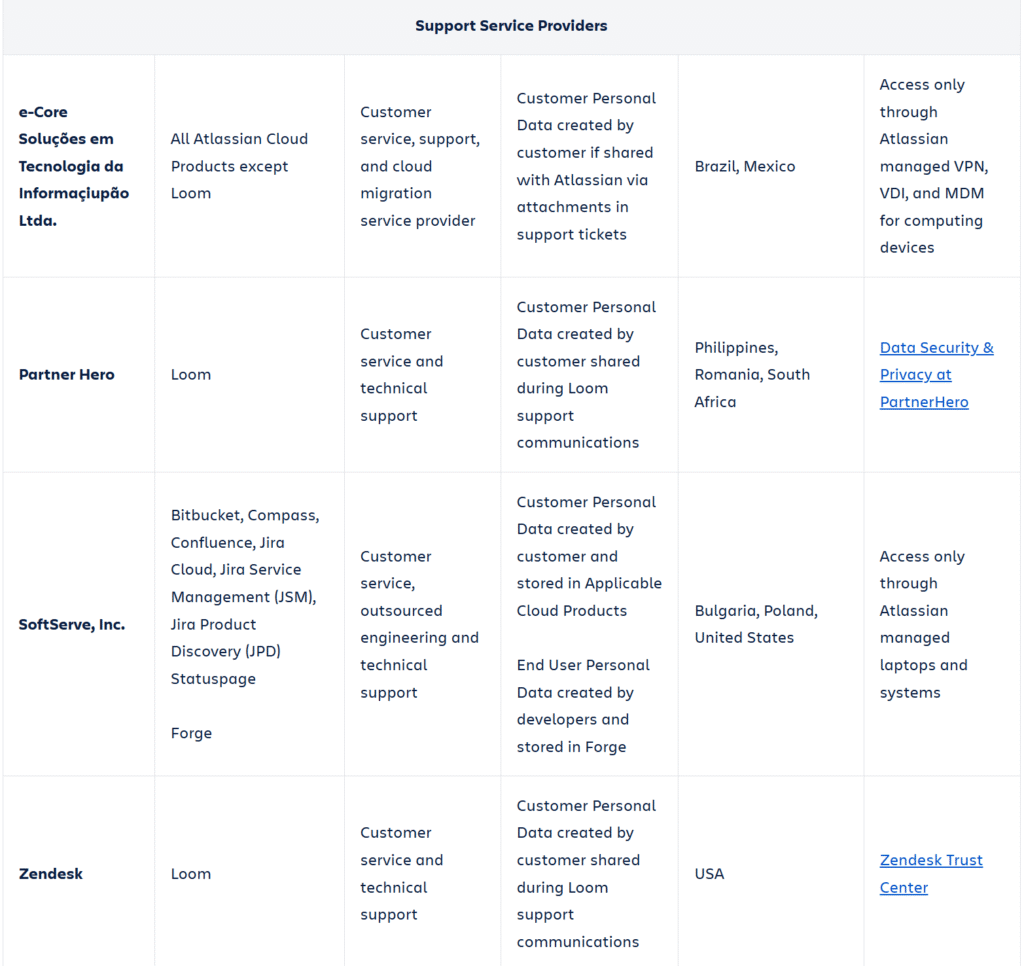
- Subprocessors: is there a current list, and is it easy to find?
- DPA availability: can you sign one without being a Fortune 500?
- Support access: do support staff access customer data by default? Is there an approval flow?
We also look for anti-patterns:
- “We may share data with trusted partners” (who?)
- Privacy policy written like it’s trying to win a loophole contest
- No subprocessor list, or one that hasn’t been updated in ages
5) Proof: do they have receipts, or just vibes?
A trust badge is not proof. A PDF isn’t proof either… but it’s closer.
We look for:
- SOC 2 Type II (not just Type I)
- ISO 27001 (and ideally 27701 if they talk privacy seriously)
- Pen test summaries (even a letter is better than nothing)
- Bug bounty / vulnerability disclosure policy
- Security contact that isn’t a black hole
Bonus points for a public “trust center” where you can find all of this without playing email tag.
The “security.txt” check (tiny signal, surprisingly telling)
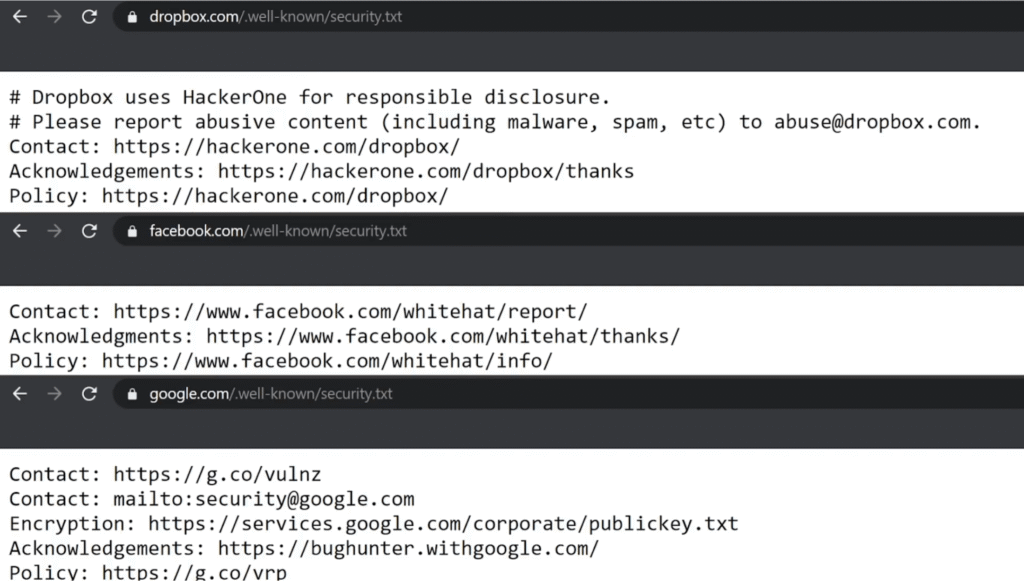
This is a quick reality check: do they support responsible disclosure like an adult?
If a vendor publishes a security.txt, it’s usually a sign they’ve operationalized vulnerability intake. Not required. But it’s a nice “they’ve been here before” signal.
6) Behavior under stress: incidents, status pages, and honesty
Every vendor breaks. The question is how they handle it.
We evaluate:
- Do they have a public status page?
- Do they post incident timelines and root cause?
- Are updates frequent and specific, or just “we’re investigating” for 6 hours?
- Do they publish postmortems for major incidents?
A status page isn’t just uptime theater. It’s a transparency culture test.
Red flags that trigger an instant downgrade
If we see these, the tool can still “pass,” but it won’t score well:
- MFA exists, but can’t be enforced
- Audit logs exist, but don’t include sensitive actions (exports, deletes, role changes)
- “Security is important” page with no concrete controls
- No subprocessor list, or “available on request” only
- Data deletion requires support tickets
- No clear data retention language
- Security contact is generic support, no disclosure policy
How we score tools (so you can compare apples to apples)
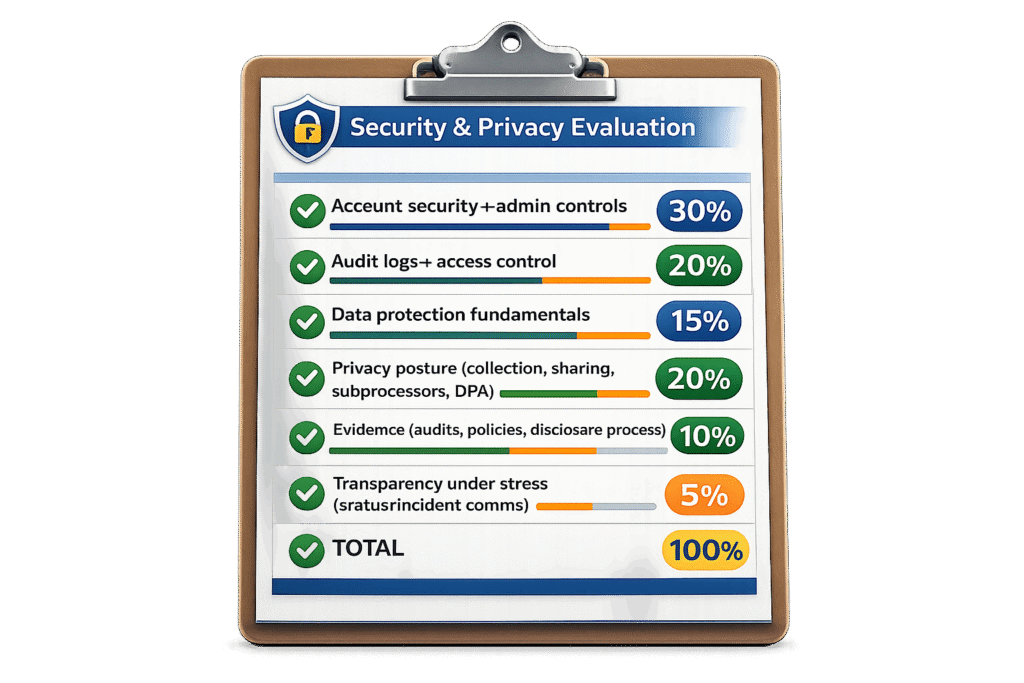
We use a weighted rubric. The weights are biased toward what hurts SMBs most.
Typical weighting:
- Account security + admin controls: 30%
- Audit logs + access control: 20%
- Data protection fundamentals: 15%
- Privacy posture (collection, sharing, subprocessors, DPA): 20%
- Evidence (audits, policies, disclosure process): 10%
- Transparency under stress (status/incident comms): 5%
Why so heavy on admin controls? Because SMBs don’t have a security team. The product has to do more of the work.
How it compares to G2/Capterra (and automated “security ratings”)
G2, Capterra, TrustRadius
These are useful for UX complaints and feature gaps. They’re not great for security and privacy.
Most reviewers can’t tell the difference between:
- “has MFA” and “can enforce MFA”
- “has permissions” and “has useful RBAC”
- “compliant” and “proven”
So we treat review sites as context, not evidence.
SecurityScorecard, UpGuard, Bitsight (automated rating platforms)
These can be helpful signals (exposed services, DNS hygiene, leaked creds, etc.). But they mostly evaluate internet-facing posture, not product controls.
A vendor can score well and still:
- lack audit logs
- lock SSO behind enterprise
- make data deletion painful
- bury subprocessor changes
We prefer evidence tied to the actual product and customer outcomes.
What to do if you need “real enterprise” assurances
If you’re handling regulated data, money movement, health info, or anything that could ruin your week if leaked, do this:
- Ask for SOC 2 Type II report under NDA
- Ask for pen test letter (or summary)
- Ask for data residency specifics
- Ask for a DPA and subprocessor change notice process
- Ask how support access to customer data is controlled and audited
If the vendor dodges all of that, you have your answer.
Who should use this evaluation (and who should skip it)
You should use our approach if:
- You’re picking SaaS for a small team and you can’t afford surprises
- You need to justify a tool to leadership without hand-waving
- You’ve been burned by “trust us” security before
You can skip this (or go lighter) if:
- The tool is low-risk (public content, no customer data, no internal docs)
- You’re experimenting for a week and nothing sensitive is involved
But if the tool will hold customer lists, employee info, invoices, contracts, or private docs… yeah, do the checklist. Future you will be less angry.
That’s the whole point.