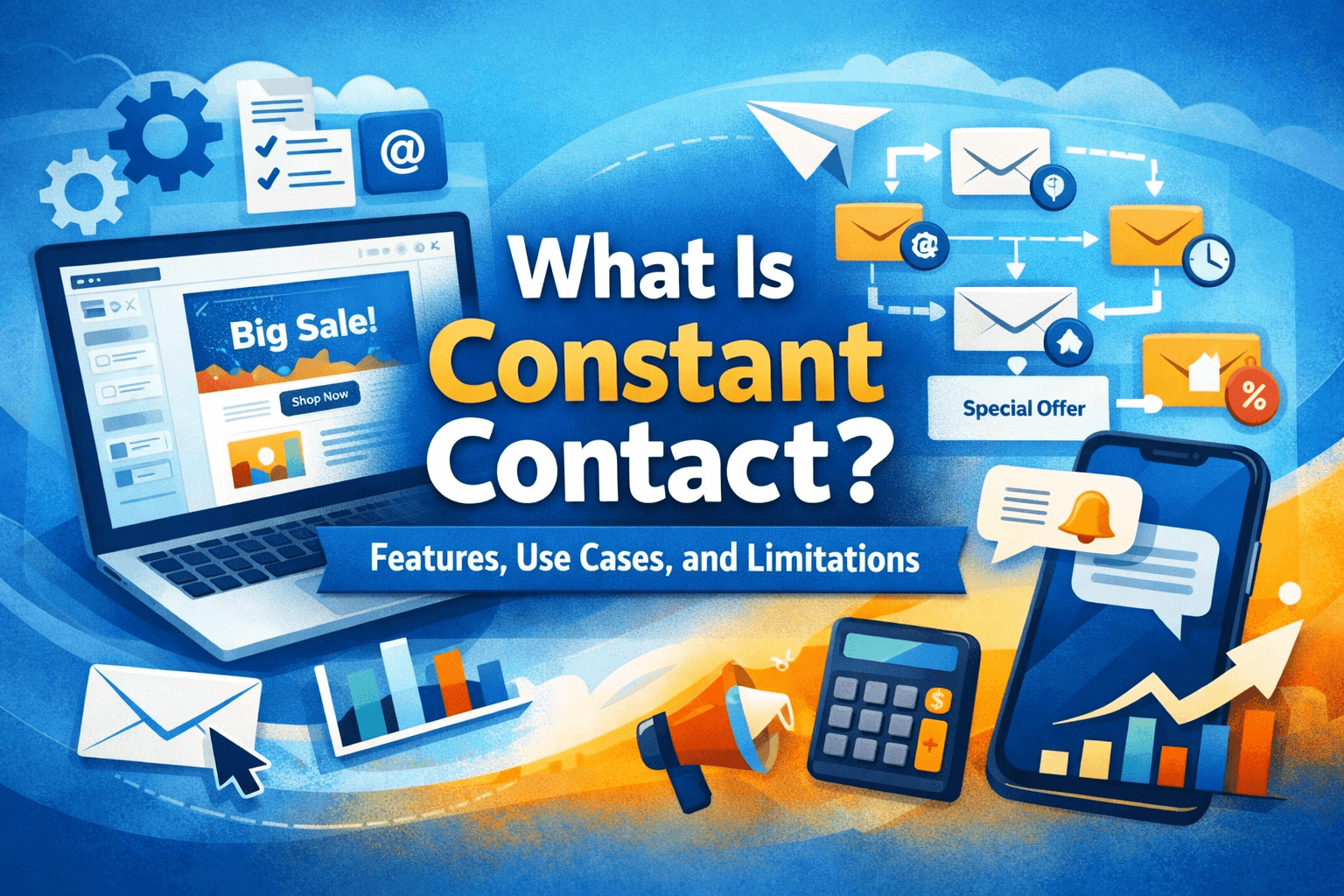
What Is Constant Contact? Features, Use Cases, and Limitations
I didn’t start using Constant Contact because I wanted to “do email marketing.” I started because I was tired of the same three problems showing up every time I needed to reach people: my contacts were scattered, my emails looked different depending on what device they opened on, and the whole process depended on me remembering every step at exactly the right time.
Constant Contact was the first tool that made the workflow feel like a routine instead of a project. Not a perfect routine—there are still days where I bump into its ceilings—but it’s the kind of platform that can quietly carry a small business’s marketing if you don’t want marketing to become your full-time job.
What Constant Contact feels like in real life
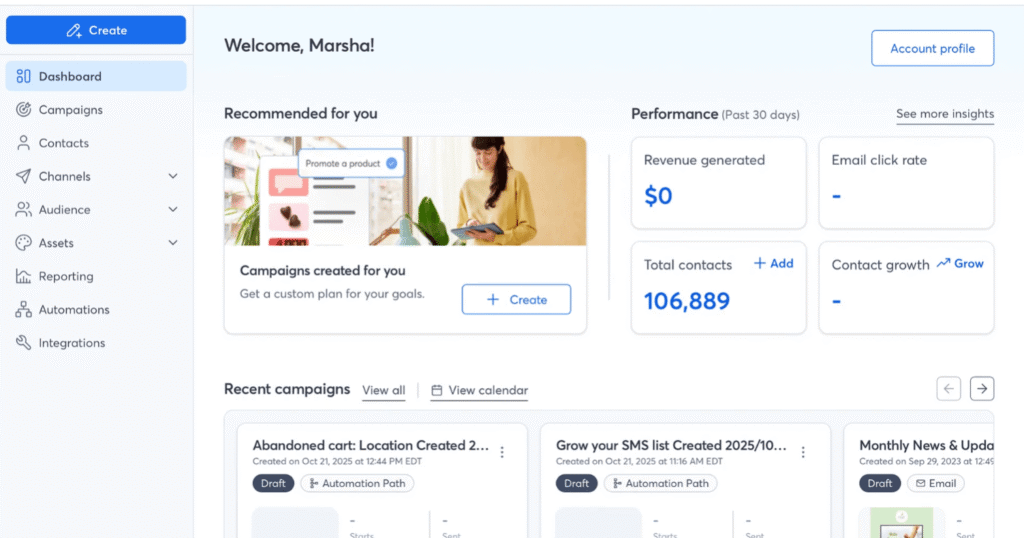
If you’ve never used it, it’s easiest to think of Constant Contact as a “small business marketing cockpit.” Email is the center of gravity, but it keeps nudging you toward a more complete setup: a real contact list, a signup form that doesn’t look sketchy, a welcome message that goes out even when you forget, basic tracking so you’re not guessing, and optional add-ons/channels if you want to expand.
The day-to-day experience is very “make something decent quickly,” not “tune every detail until it’s perfect.” That bias shows up everywhere—in good ways (speed, fewer decisions) and in ways that can get annoying once you’ve outgrown the basics.
The parts I actually touch every week
The email builder: fast, forgiving, a little limiting
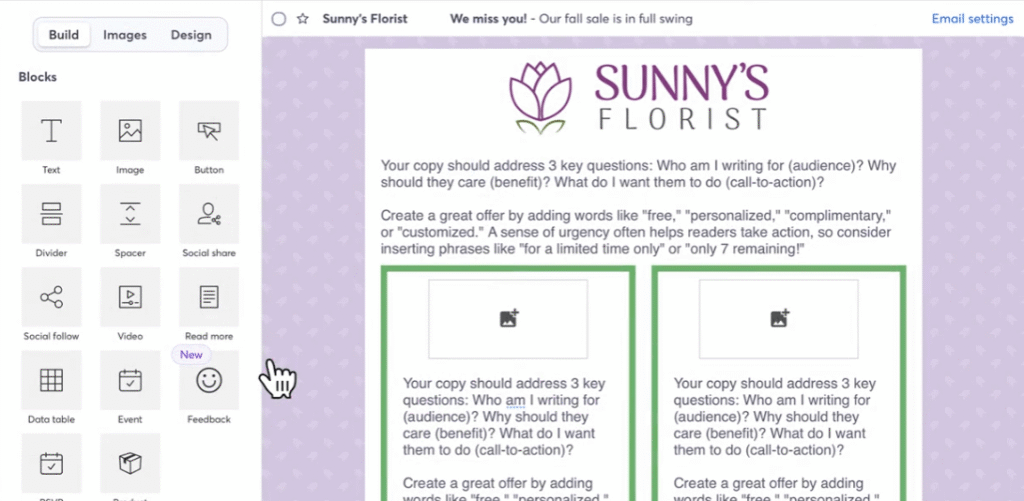
The drag-and-drop editor is the reason I kept coming back early on. I can assemble a clean newsletter without overthinking it: header, image, text, button, maybe a product block if I’m promoting something. It’s hard to make something truly ugly, and that’s a compliment.
Where it shines is the “I need this out today” moment. I’ve reused the same layout for months, swapped the hero image, updated the copy, scheduled it, done. When I’m busy, that consistency matters more than creative freedom.
The flip side is that once you care about precision—spacing that doesn’t fight you, a layout that breaks the template a bit, a very specific mobile look—you start to feel the walls. I’ve had emails where I knew exactly what I wanted visually, and I could get close, but not nail it without doing awkward workarounds (or settling).
Templates and branding: better than starting from blank
Constant Contact’s templates and “brand” tools are basically a sanity saver for anyone who isn’t a designer. When I was sending my first real campaigns, just having something that looked professional out of the gate changed my confidence level. I noticed I spent less time staring at the screen and more time writing something people might actually want to read.
That said, templates can make your emails look like… templates. If you’re trying to build a very distinct visual identity, you’ll probably end up doing more tweaking than you expect.
Contact management that’s practical, not fancy
What I appreciate most is how quickly it turns “a list of people” into something usable. Importing contacts is straightforward, and it doesn’t take long before you have a clean place to manage signups, unsubscribes, and basic segmentation.
The segmentation is good enough for real-world small business needs—customers vs. prospects, event attendees, people who clicked a specific link, VIPs you tag manually—but it’s not the type of segmentation that makes power users grin. I’ve definitely had moments where I wanted more flexible logic and realized I was about to fight the tool.
Signup forms: the quiet workhorse
This is one of those features that isn’t exciting until you realize how often it saves you. Having a basic web signup form means I’m not manually copying emails from DMs, paper sign-in sheets, or random messages like “Please add my cousin too.”
Once the form is in place, the list grows with less friction. And psychologically, it’s a big shift: you stop thinking of your audience as a messy pile of names and start treating it like a real channel.
Automation: helpful for the basics, frustrating when you want more
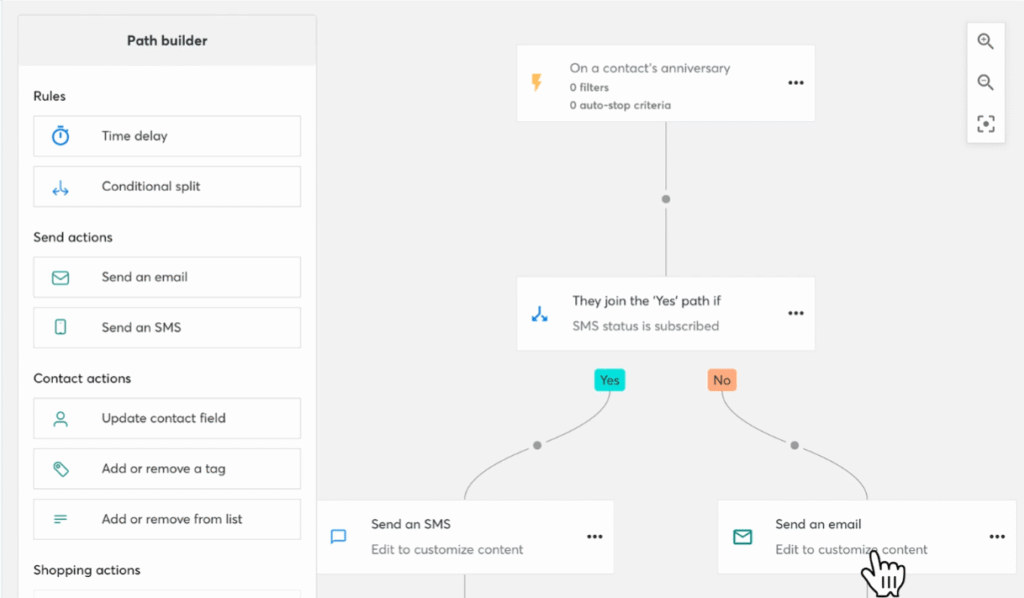
Constant Contact’s automation is at its best when you keep it simple: a welcome email, a short onboarding sequence, a “thanks for signing up” nudge, a resend to people who didn’t open. In that lane, it’s genuinely useful because it removes the need for perfect timing on your part.
I ran a welcome sequence for months without touching it, and that alone justified a chunk of the subscription for me—because it caught new subscribers at the exact moment they were most interested.
But if you’re picturing deep branching journeys, lots of behavior-based paths, or very nuanced personalization, you’ll hit a ceiling. I’ve had times where I wanted to build a more sophisticated flow and ended up simplifying the idea just to fit the automation model.
Reporting: enough to steer, not enough to obsess
The reporting tells me what I need to know to make practical decisions: did people open, did they click, which links got attention, who is consistently engaging.
It’s great for answering questions like:
- “Was that subject line a mistake?”
- “Are people actually clicking the offer, or just skimming?”
- “Which segment is responding?”
It’s less great if you want to slice the data into ten different angles or build advanced attribution stories. It’s not really built for forensic analysis. I’ve learned to treat it like a compass, not a microscope.
Social posting and ads: convenient, not magical
The social features feel like they’re designed for the same person who benefits from the email builder: someone who wants to stay consistent and visible without turning into a full-time content scheduler.
I’ve used it when I needed to promote an event or keep a basic posting rhythm going. It’s nice to have it in the same place, and it reduces the “one more tool” feeling. But it won’t suddenly make social easy. It just makes it more organized.
Events and ecommerce-adjacent features: useful if that’s your world
Constant Contact has leaned into event-based marketing and selling—things like hosting events, collecting payments, promoting registrations. If your business has workshops, classes, fundraisers, pop-ups, or recurring community events, this becomes a real value add because it connects your promotion and your follow-up.
If you never run events, you can ignore most of this and still get full value from the email side.
Integrations: the difference between “another list” and “the list”
Integrations matter more over time. In the beginning, I was fine with a clean email list. Later, I started caring about keeping contact data aligned with the other tools I already used.
When integrations work smoothly, Constant Contact stops feeling like a separate island. When they don’t, you’ll feel the friction immediately—usually as duplicate contacts, messy tagging, or “why is this person not in the segment I thought they’d be in?”
SMS: tempting, but not as universal as email
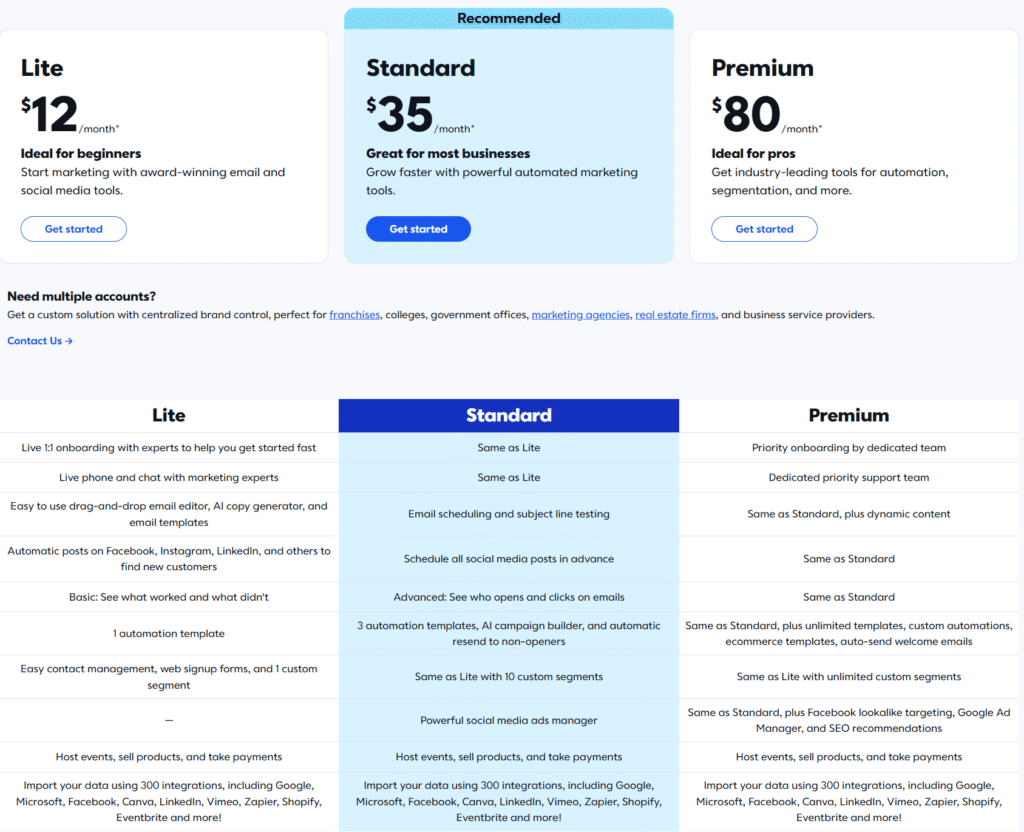
SMS can be added as an additional channel, and it’s powerful in the “quick update” sense: reminders, last-minute promos, event changes, short VIP alerts. When I used it, it felt most effective when I treated it like a scalpel, not a megaphone—short bursts to a clearly opted-in group.
The limitation is that SMS availability and setup can be more constrained than email (including region restrictions), and it tends to introduce extra compliance and list-hygiene discipline. It’s not hard, but it’s less forgiving than email.
Where Constant Contact has genuinely worked for me
I keep coming back to Constant Contact in seasons where I want marketing to feel lighter. The platform shines when you have something real to communicate, but you don’t want to spend your week stitching together tools.
Here are the scenarios where it’s been the most natural fit in my own use:
- A local business rhythm: weekly or biweekly newsletters, monthly promos, seasonal announcements, holiday schedule updates.
- Community-driven organizations: fundraisers, volunteer drives, membership renewals, event invites, donation follow-ups.
- Service businesses with appointments: reminders, “we have openings,” referral nudges, review requests (done thoughtfully).
- Workshops and events: registrations, pre-event instructions, last-minute updates, post-event follow-ups.
- Newer lists that need structure: when your contacts are messy and you need a real signup pipeline.
In those contexts, Constant Contact feels like it’s doing the job it was designed to do: keep you consistent, help you look professional, and reduce the number of steps you can forget.
The limitations you’ll notice once the honeymoon phase ends
This is where Constant Contact becomes a very specific kind of tool. If you expect it to scale with you forever, you may end up irritated. If you treat it as a reliable “small business marketing hub” with known ceilings, it stays satisfying.
You can outgrow the automation pretty fast
The automation tools are great for foundational flows, but they don’t always support the kind of complexity that growing teams eventually want. I’ve had to choose between:
- building the “real” journey I had in mind, or
- building the journey Constant Contact can execute cleanly.
I usually chose clean execution. But it’s a real limitation if your marketing strategy depends on nuanced paths.
Segmentation is usable, but not endlessly flexible
If your segmentation needs are straightforward, you’ll be fine. If you’re the type of person who wants lots of layered rules—behavior + source + purchase history + time windows—you’ll feel restricted.
This is one of those issues that doesn’t show up on day one. It shows up three months later, when you start thinking, “Wait, why can’t I create this exact audience definition?”
Design control is “good enough,” not “pixel-perfect”
I’ve had emails where the editor felt effortless—and others where I spent too long trying to make a small spacing choice behave. It’s not a broken editor; it’s just opinionated. It prioritizes speed and consistency over unlimited control.
If your brand depends on very specific layouts, or you want highly custom designs regularly, you may find yourself settling more than you want.
Pricing scales in a way you need to take seriously
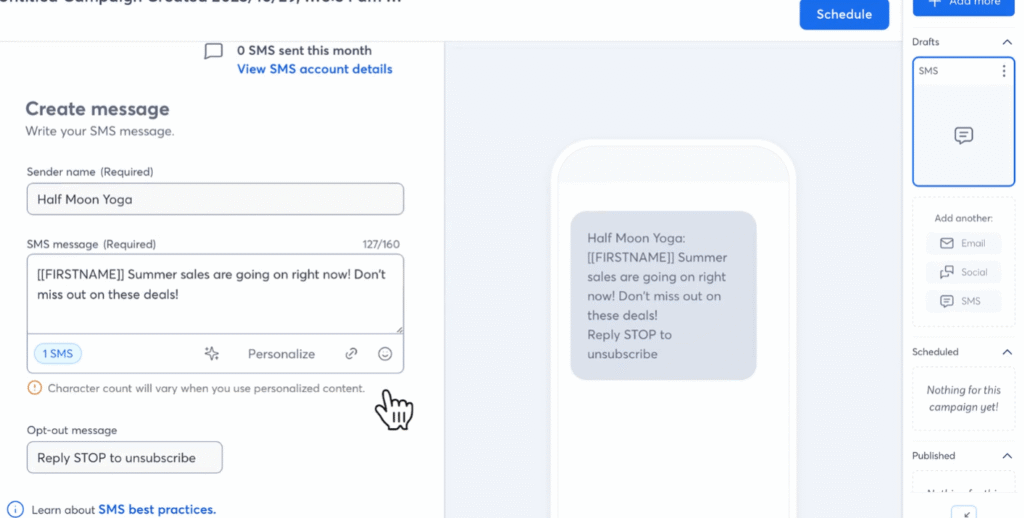
This isn’t unique to Constant Contact, but it matters: cost tends to rise with list size and feature tier. The moment you move from “a small list I email occasionally” to “a real audience I email consistently,” you should expect the subscription to become a more noticeable monthly expense.
The way I’ve made peace with it is simple: I only keep paying when it’s actively saving me time or reliably driving revenue/attendance. If I’m not sending, I don’t pretend the tool is “working in the background.” It’s not a gym membership.
Multi-user and “team” workflows depend on plan reality
If you’re a solo operator, you won’t care. If you have a small team, user limits and permissions start to matter. Constant Contact can support team workflows, but whether it feels smooth depends on which plan you’re on and how many cooks are in the kitchen.
SMS adds power—and extra complexity
Texting sounds like a shortcut until you actually implement it: opt-ins, compliance considerations, list discipline, message frequency sensitivity. It can work brilliantly, but it’s not a “turn it on and profit” feature, and it won’t fit every business or region equally well.
Who should keep reading, and who can skip
Constant Contact makes the most sense for people who want a dependable system more than a playground.
If you’re any of these people, it’s worth a serious look:
- You run a small business or organization where email is a consistent channel—not a one-off blast.
- You want professional-looking emails without learning design or HTML.
- You value guidance, templates, and a workflow that keeps you moving.
- You run events, classes, or community activities and want promotion + follow-up to live together.
- You want basic automation that reduces forgetting and improves consistency.
On the other hand, you can probably skip it if:
- You’re building a complex lifecycle engine and you already know you need advanced automation logic.
- Your segmentation needs are highly specific and constantly evolving.
- Your brand demands tight design control and you hate working within templates.
- You’re extremely price-sensitive as your list grows and you don’t expect email to drive measurable returns.
- You’re primarily chasing cutting-edge features and experimentation, not stability.
Constant Contact, at its best, feels like a steady marketing assistant that doesn’t require you to become a marketing technologist. At its worst, it feels like a tool that’s politely telling you, “That’s beyond my scope.” The trick is knowing which side of that line you’re actually on—and being honest about how complicated your marketing really needs to be.